

Recorder
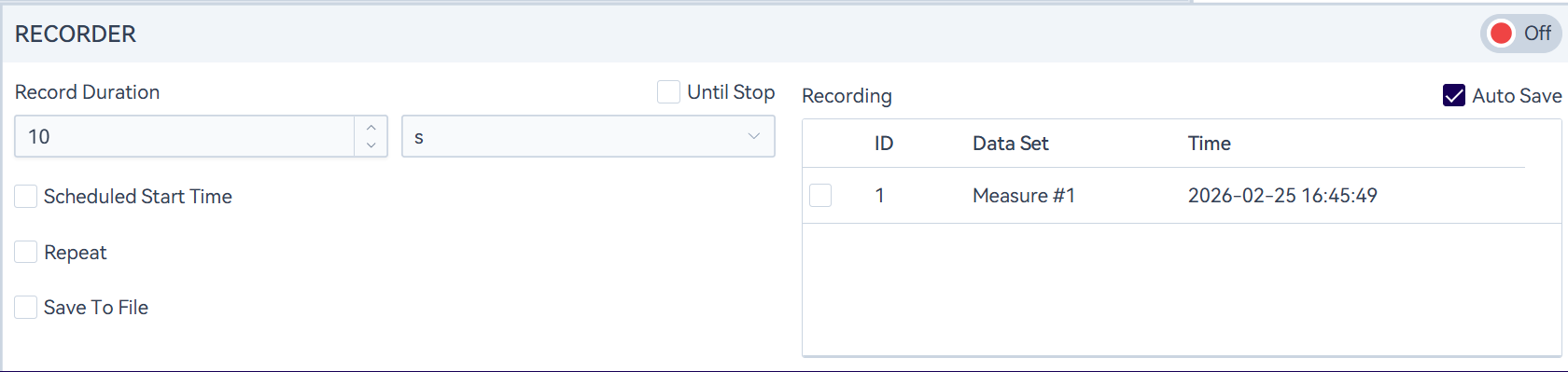
In the monitor panel, a recording function is set up.
Click the " " icon in the upper right corner of the recording panel to start recording waveforms. You can end the recording either when the set recording duration is reached or by manually clicking the "
 " icon. Please note that during long-time recording, the system will automatically stop recording when it detects that the remaining storage space is less than 1 GB, so as to avoid data loss and other issues. Please reserve sufficient storage space before testing.
The recorded data supports playback, and the waveform can also be automatically saved to a specified path.
Continuous Recording
Select "Until Stopped" and the recording duration will no longer take effect. After recording starts, you must click Stop manually to end it. If storage space becomes insufficient during recording, the protection mechanism will also automatically stop the recording.
Scheduled Recording
Check "Scheduled Start" to automatically start recording at a specified time. For example, set the start time to 08:00:00, the recording duration to 12 h, and repeat 3 times. After you click Start, as long as the software interface stays on the current page, recording will start for 12 h at 08:00:00 each time, repeat 3 times, and then stop automatically.
Repeat Recording
When repeat recording is enabled in non-scheduled recording, you can set the number of repeats and the interval. For example, set the recording duration to 10 s, repeats to 5, and the interval to 1 s. After clicking Start, the first recording begins immediately. After 10 s, it records again with a 1 s interval between recordings, repeating 4 more times.
When repeat recording is enabled during scheduled recording, only the number of repeats can be set. For example, set the start time to 08:00:00, the recording duration to 12 h, and repeat 3 times. After you click Start, recording will begin for 12 h at 08:00:00 each time, and will stop automatically after repeating 3 times. If the software is closed midway, any recordings that have not yet been triggered will no longer be triggered after closing. If the configured start time occurs while recording is in progress (e.g., start time 10:00:00, duration 26 h, repeats 3), the first recording starts at 10:00:00 and continues for 26 h; it will not stop when 10:00:00 occurs again during the recording, and it will wait for the next 10:00:00 only after the first recording ends.